πŸ›οΈ Government of India Initiative | πŸ“± 24/7 Available
☎️ 1800-180-1551 βœ‰οΈ Email Support

PM Kisan Status Check

Check Your Status | Track Installments | Complete eKYC

β‚Ή6,000 Annual Financial Assistance for Farmers

21st Installment Released | Nov 19, 2025 | β‚Ή18,000 Crore Disbursed to 9 Crore Farmers

About PM Kisan Status Nidhi

A Government of India Initiative for Small and Marginal Farmers

The Pradhan Mantri Kisan Samman Nidhi (PM Kisan) is a central government scheme launched in February 2019 to provide direct financial support to eligible farmer families. The scheme aims to boost the income of small and marginal farmers by providing β‚Ή6,000 per year in three equal installments of β‚Ή2,000 each, credited directly to farmers' bank accounts every four months.

21st Installment Status - November 2025

β‚Ή18,000 Cr
Total Disbursed
9 Cr
Farmers Benefited
β‚Ή6,000
Annual Assistance
3
Installments/Year

Implementation: The scheme is implemented by the Department of Agriculture & Cooperation and Farmers Welfare, Ministry of Agriculture & Farmers Welfare, through respective State and Union Territory governments. Farmers can register themselves, check status, and update eKYC directly on the official PM Kisan portal.

Official PM Kisan Resources

Direct Access to Government Services

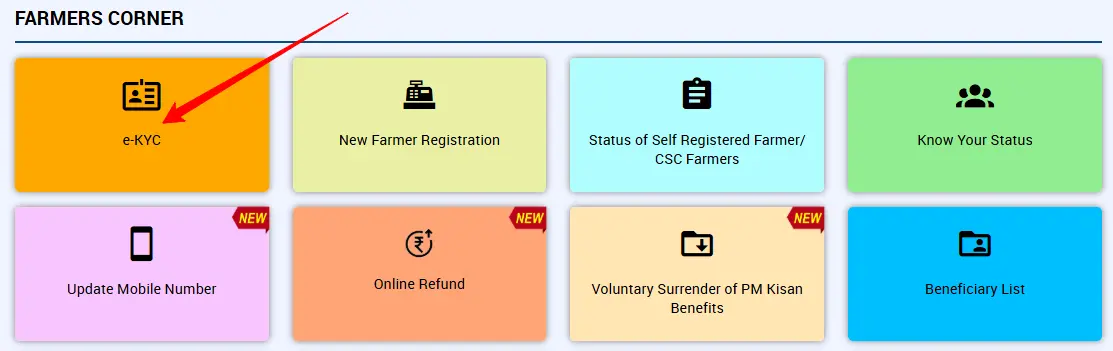
🌾 FARMERS CORNER

πŸ“‹ e-KYC 🏠 New Farmer Registration βœ“ Status of Self Registered Farmer/CSC Farmers πŸ‘€ Know Your Status
NEW πŸ“± Update Mobile Number
NEW πŸ’° Online Refund
NEW πŸ“₯ Voluntary Surrender of PM Kisan Benefits
πŸ“Š Beneficiary List

How to Check Your PM Kisan Status

Step-by-Step Guide Using Official Portal

1

Visit Official Portal

Go to pmkisan.gov.in using your web browser on desktop or mobile device.

2

Navigate to Farmers Corner

Look for and click on the "Farmers Corner" section on the homepage navigation menu.

3

Select Know Your Status

From the dropdown menu, select "Know Your Status" or "Beneficiary Status" option.

4

Enter Details or Find Registration Number

If you have your registration number, enter it directly. Otherwise, click "Know Your Registration Number" and use your Aadhaar or mobile number to retrieve it.

5

Verify with OTP

You'll receive an OTP on your registered mobile number. Enter the OTP to verify your identity.

6

View Your Complete Status

Your PM Kisan status will be displayed showing beneficiary details, installment payment history, bank account, and eKYC status.

PM Kisan Know Your Status Form

Screenshot: PM Kisan Know Your Status Form - Enter Registration Number & Get OTP

PM Kisan Beneficiary Status

Screenshot: PM Kisan Beneficiary Status - Complete Status Details with Payment History

Check PM Kisan Beneficiary List by Village

Find Your Name in the Official Beneficiary List

Why Check the Beneficiary List?

  • Verify your name is officially registered in the scheme
  • Confirm your status among eligible farmers in your village
  • Track any updates to the beneficiary list
  • Ensure continuous eligibility for installments
  • Identify if corrections are needed in your record

The beneficiary list is updated regularly by state and district authorities. It's important to check frequently, especially when the state updates names due to mutations or record corrections.

How to Access the List

  1. Visit pmkisan.gov.in
  2. Click "Beneficiary List" in Farmers Corner
  3. Select your State from dropdown
  4. Select your District
  5. Select Sub-District (Tehsil/Taluk)
  6. Select your Block
  7. Select your Village
  8. Click "Get Report"
πŸ“‹ Note: The list will show beneficiary names, father's/husband's names, and other details. Print or save the report for your records.
PM Kisan Beneficiary List Form

Screenshot: PM Kisan Beneficiary List Form - Select State, District, Block & Village

PM Kisan Beneficiary List Report

Screenshot: PM Kisan Beneficiary List Report - Complete List of Farmers in Your Village

PM Kisan eKYC - Mandatory Verification

Three Ways to Complete Your Electronic Know Your Customer (eKYC)

eKYC (Electronic Know Your Customer) is a mandatory process required for all registered PM Kisan farmers. Without completing eKYC, you cannot receive future installments. The process verifies your Aadhaar and bank account to ensure correct payment transfer.

Method 1: Online OTP-Based eKYC (Fastest)

1

Visit PM Kisan Portal

Go to pmkisan.gov.in and navigate to Farmers Corner β†’ e-KYC

2

Enter Aadhaar Number

Enter your 12-digit Aadhaar number and solve the captcha, then click Search

3

Receive OTP

You'll get an OTP on your Aadhaar-linked mobile number. Copy and enter it.

4

Successful Completion

You'll see a confirmation message. Your eKYC is now successfully updated.

βœ“ Recommended: This is the fastest and easiest method. Complete it online in just 5-10 minutes.

Method 2: Offline Biometric Authentication

Steps:

  • Visit your nearest Common Service Centre (CSC) or authorized PM Kisan Seva Kendra
  • Bring your Aadhaar card and PM Kisan registration details
  • CSC operator will verify your fingerprint or iris scan
  • Your PM Kisan KYC ledger will be updated automatically
  • You'll receive a receipt from CSC - keep it safe for payment verification
  • Nominal fee applies (β‚Ή100-200 approximate)

Method 3: Face Authentication via Mobile App

Steps:

  • Download PM Kisan Mobile App from Google Play Store
  • Also download Aadhaar Face RD App from Google Play Store
  • Open PM Kisan app and log in with your registered mobile number
  • Navigate to eKYC section and select Face Authentication
  • Allow camera access and complete the face scan process
  • Once verified, your PM Kisan eKYC will be instantly updated
  • This method is convenient for remote areas with no CSC nearby
⚠️ Important: Complete your eKYC immediately to ensure uninterrupted receipt of PM Kisan installments. Future installments will not be credited if eKYC is not completed.
PM Kisan eKYC Form

Screenshot: PM Kisan eKYC Form - Complete Electronic Know Your Customer Verification
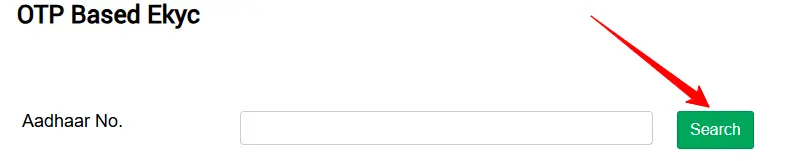
OTP Based eKYC

Screenshot: OTP Based eKYC - Enter Aadhaar Number & Receive OTP for Verification

Troubleshooting Common Issues

Solutions to Status Check Problems and Error Messages

❌ Aadhaar is Not Authenticated / Aadhaar is Not Seeded
Reason
Your Aadhaar card details have not been successfully verified with the government system, or your Aadhaar is not linked to your bank account. This usually happens when your Aadhaar name doesn't match your PM Kisan registration or bank account name, or when e-KYC is incomplete.
Solution
Step 1: Complete your e-KYC immediately using any of the three methods mentioned above. Step 2: Ensure your Aadhaar is linked (seeded) with your bank account by visiting your bank's nearest branch. Step 3: Verify that the name on your Aadhaar, bank account, and PM Kisan registration are identical.
⏳ Correction is Pending at State / Pending for Approval
Reason
Your application is undergoing formal review by state or district authorities. They are verifying your land records and validating your application data. This is a standard process and doesn't necessarily indicate an error.
Solution
No immediate action required. The state government handles this process. Check your status periodically on the portal. If it remains pending for more than 30 days, contact your Block Agricultural Officer or District Agriculture Office directly with your registration number.
🏦 Farmer Record Rejected by PMFS/Bank
Reason
Your bank account details have been rejected by the Public Financial Management System (PMFS) or your bank. Common reasons: incorrect bank account number, wrong IFSC code, name mismatch between bank and PM Kisan registration, or your bank account is inactive/closed.
Solution
Step 1: Log in to PM Kisan portal and correct your bank account details. Step 2: Ensure the name on your bank account exactly matches your Aadhaar card and PM Kisan registration. Step 3: Visit your bank to confirm your account is active. Step 4: Resubmit the corrected bank details through the portal or visit a CSC for assistance.
πŸ’³ Payment Awaited for Approval by State
Reason
This is a positive status that appears just before an installment is released. Your state government has verified your details and is waiting to send the fund transfer request to the central government.
Solution
No action needed. This is a temporary status. Wait for 2-3 days, and it will change to "RFT Signed by State Government" once the state approves and sends the request. Your payment will be credited within 3-5 working days.
πŸ“Š FTO is Generated and Payment Confirmation Pending
Reason
FTO (Fund Transfer Order) means the central government has issued a fund transfer order. Your payment is in the final stages of being credited to your bank account.
Solution
Wait for 2-5 working days. No action is required from you. The installment amount (β‚Ή2,000) will be automatically credited to your registered bank account.
πŸ—ΊοΈ Land Seeding is "No"
Reason
Your land records have not been uploaded or verified by state authorities. Without land seeding, you will not receive future installments.
Solution
Contact your Block Agricultural Officer or Tehsildar's office with your land documents (Khasra, Khatauni, or land passbook). They will verify and seed your land records in the system. This process is handled at the state and district level.

New Farmer Registration Process

How to Apply for PM Kisan Yojana in 2025

Eligibility Criteria

βœ“ Who Can Register:

  • All land-holding farmer families
  • Families with cultivable land
  • Indian citizens with valid Aadhaar

βœ— Who Cannot Register:

  • Institutional landholders
  • Serving government employees
  • Income tax assesses
  • Professionals (doctors, engineers, lawyers, CAs)
  • Former/present constitutional officials
  • Pensioners earning β‚Ή10,000+ monthly

Documents Required

  • Aadhaar Card - 12-digit ID (mandatory)
  • Bank Account Details - Account number and IFSC code
  • Land Records - Khatauni, Khasra, or land passbook
  • Passport-size Photo - Recent photograph
  • Mobile Number - Active and Aadhaar-linked
  • Proof of Citizenship - Voter ID or passport

All documents should be in PDF format (under 5MB each) for online submission.

Registration Steps

1

Visit Official Portal

Go to pmkisan.gov.in and select "New Farmer Registration" from Farmers Corner

2

Enter Basic Details

Enter your 12-digit Aadhaar, mobile number, select state, and solve captcha

3

Authenticate with OTP

Receive OTP on your Aadhaar-linked mobile and enter it for verification

4

Fill Detailed Form

Complete the full application form with personal info, bank details, and land details

5

Upload Documents

Upload PDF scans of Aadhaar, land records, bank passbook, and photos

6

Submit & Get Receipt

Submit the form and save your registration number for future reference

7

Track Application Status

Use "Status of Self Registered Farmer" to track your application progress

πŸ’‘ Tip: If you're not comfortable with online registration, visit your nearest Common Service Centre (CSC) or authorized revenue office. They can help you register for a nominal fee (β‚Ή50-100).

Frequently Asked Questions

Answers to Common Questions About PM Kisan

What is the PM Kisan Samman Nidhi Yojana? β–Ό
The PM Kisan is a central government scheme launched in February 2019 to provide direct financial assistance of β‚Ή6,000 annually (β‚Ή2,000 in three installments) to eligible farmer families. The funds are transferred directly to farmers' bank accounts via Direct Benefit Transfer (DBT), ensuring transparency and timely payment.
How much money can I get from PM Kisan? β–Ό
You can receive β‚Ή6,000 per financial year. This is divided into three equal installments of β‚Ή2,000 each, paid every four months (approximately in April, August, and December). The payments are made directly to your bank account.
How do I check my PM Kisan registration status? β–Ό
Visit pmkisan.gov.in and use the "Status of Self Registered Farmer/CSC Farmer" option in Farmers Corner. Enter your Aadhaar number and receive an OTP on your mobile. Your registration status will show whether it's approved, rejected, or under process.
What if I don't know my PM Kisan registration number? β–Ό
Go to pmkisan.gov.in β†’ Farmers Corner β†’ Know Your Registration Number. Enter your Aadhaar card number or mobile number. You'll receive an OTP on your mobile, and after verification, your registration number will be displayed.
Know Your Registration Number Form

Screenshot: Know Your Registration Number - Enter Aadhaar or Mobile Number

Is eKYC mandatory for PM Kisan? β–Ό
Yes, eKYC is mandatory. Without completing eKYC, you cannot receive future installments. You can complete it online using OTP, biometric authentication at a CSC, or face authentication via mobile app. Complete it as soon as possible to ensure uninterrupted benefit transfer.
How often should I check my PM Kisan status? β–Ό
Check your status at least monthly, especially before expected installment dates. Installments are typically released in April, August, and December. Regular checks ensure you catch any issues early and can get them resolved before the next payment cycle.
What if my status shows "Under Process"? β–Ό
"Under Process" means your application is being verified by state authorities. This typically takes 2-4 weeks. During this time, your land records and personal details are being validated. Check back after a week or two.
Can I check PM Kisan status without a registration number? β–Ό
Yes, you can retrieve your registration number using your Aadhaar card and mobile number through the "Know Your Registration Number" feature on pmkisan.gov.in. Once you have it, use it to check your beneficiary status.
When will I receive my next installment? β–Ό
The 21st installment was released on November 19, 2025. Installments are typically released in April, August, and December. Check your status on the portal to see if you're eligible and if there are any pending requirements (like eKYC) that need to be completed.
Who should I contact if I have issues with my PM Kisan account? β–Ό
Call the PM Kisan Helpline at 011-24300606, 155261, 1551, or 1800-180-1551 (toll-free). You can also email [email protected]. For local issues, contact your Block Agricultural Officer or District Agriculture Office with your registration number.

Government Support & Contact Information

Official PM Kisan Helpline and Resources

πŸ“§ Email Support

[email protected]

Response time: 2-3 working days

🌐 Official Website

pmkisan.gov.in

Available 24/7 for online services

πŸ›οΈ Local Contacts

Block Agricultural Officer (BAO)

District Agriculture Officer (DAO)

Nearest Common Service Centre (CSC)

Key Points to Remember

Important Information for PM Kisan Beneficiaries

βœ“ Check Status Regularly

Monitor your PM Kisan status at least monthly to ensure all requirements are met and track upcoming installments.

βœ“ Complete eKYC ASAP

eKYC is mandatory. Complete it immediately through the online OTP method for fastest processing.

βœ“ Verify Details Match

Ensure your name, Aadhaar, bank account details, and PM Kisan registration are identical to avoid payment issues.

βœ“ Keep Documents Safe

Save all receipts, registration numbers, and eKYC confirmations for record-keeping and troubleshooting.

βœ“ Seek Help if Needed

Don't hesitate to contact local Block Agricultural Officer or PM Kisan helpline if you face any issues.

βœ“ Stay Updated

Follow official PM Kisan updates on pmkisan.gov.in to stay informed about new installments and policy changes.